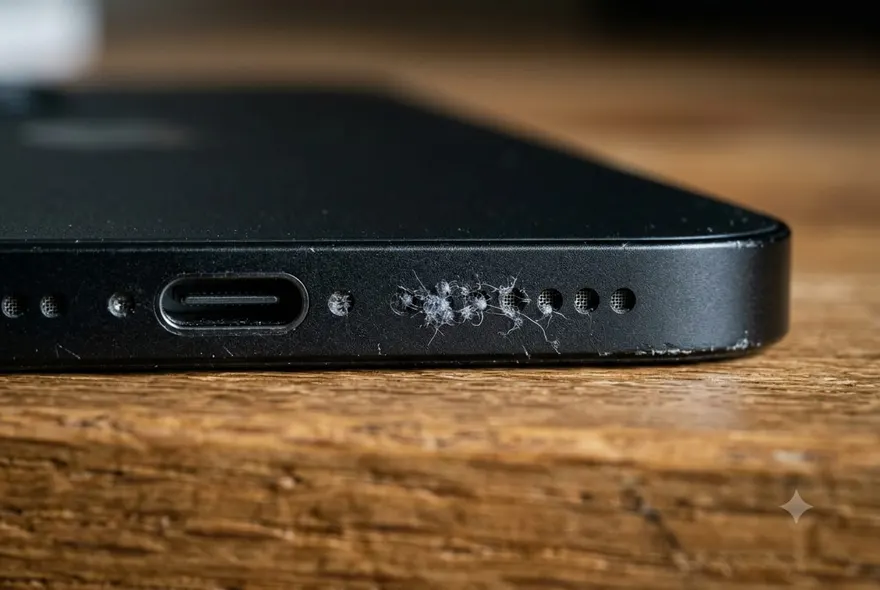
An iPhone speaker gets quieter over a year or two, and most people do not notice until they hold a friend’s newer phone next to theirs. The grille is a row of tiny holes over a mesh, and everything a pocket contains — lint, skin, sand, the crumbs of a thousand snacks — ends up packed into it. Cleaning it out takes ten minutes and a couple of things you already own. Doing it wrong takes one poke with a pin.
This is how to clean the speakers on an iPhone properly: which speaker, what is in it, and what to use for each.
First: which speaker, and what is in it?
An iPhone has two speakers. The bottom speaker is the grille beside the charging port — on every model since the iPhone 7 only one side of the two grilles is actually a speaker; the other is a microphone. It plays music, videos, ringtones and speakerphone. The top speaker, also called the earpiece or ear speaker, is the thin slot above the screen. It plays calls, and on newer models it doubles as a second stereo channel for music.
Then work out what is in there, because the fix is different:
- Lint and dust — quiet, slightly dull sound that got worse slowly. Shine a torch on the grille: grey fluff in the holes. Brush and putty.
- Water — muffled suddenly, after the phone got wet. The holes look clean. A tone, not a brush. That part is at the end.
- Dried gunk — sweat, sunscreen, a sticky drink. The holes look glazed or crusty. Putty first, then a cloth damp with isopropyl on the outside surface only.
What to use, and what never to use
Use:
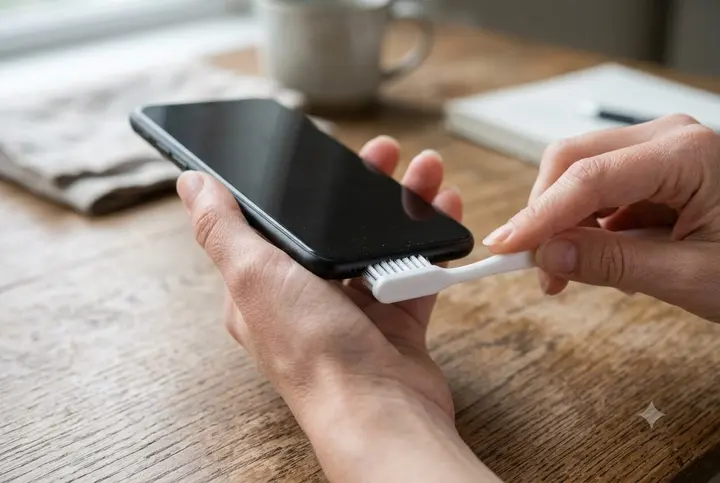
- A soft toothbrush, dry, that has never seen toothpaste. A new one is ideal; a child’s brush is softer still.
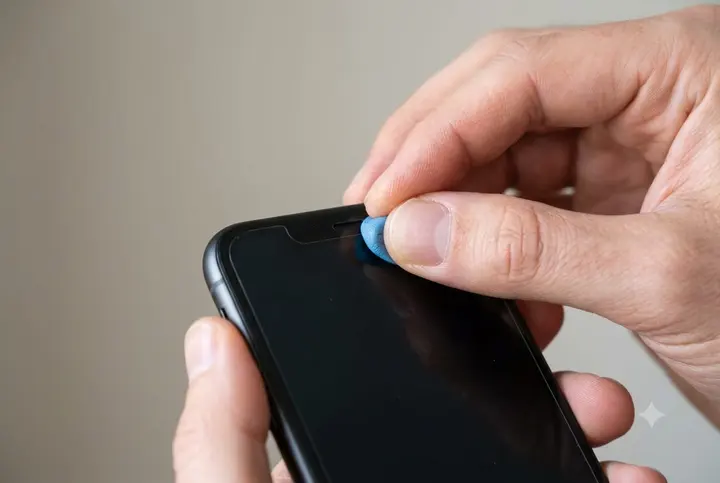
- Reusable adhesive putty — Blu-Tack, poster tack, whatever it is called where you are. A pea-sized piece, warmed in your fingers.
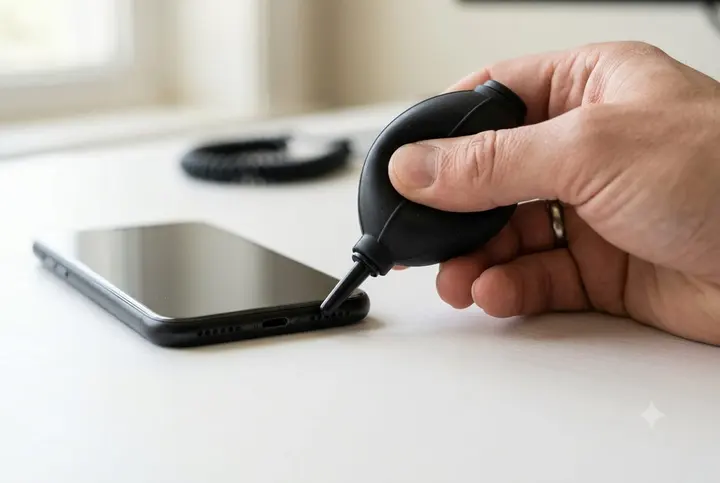
- A rubber bulb blower, the kind sold for camera lenses. A few dollars, and it moves air without moisture or propellant.
- Painter’s tape or a Post-it’s sticky strip for lifting surface fluff.
- A torch, so you can see what you are doing.
Never:
- Pins, needles, SIM tools, paper clips. The mesh under the holes is thinner than paper. One poke and the speaker is open to everything.
- Canned compressed air. It blasts debris inward, and the propellant leaves a film of moisture.
- Liquids into the holes. No water, no alcohol, no cleaning spray. Whatever goes in carries the dirt with it, and it does not come back out.
- Sticky tape with strong glue. Duct tape and packing tape leave residue in the holes, which then holds more lint.
- A vacuum cleaner. The suction is strong enough to pull the diaphragm out of position. Yes, really.
How to clean the iPhone speaker holes (bottom speaker)
- Power off so a stray touch does not trigger anything, and take the case off — cases hide a surprising amount of debris around the grille.
- Brush. Hold the phone with the bottom edge facing down so what you loosen falls out rather than in. Brush across the row of holes, side to side, with light pressure — think dusting, not scrubbing. Ten to twenty strokes. Tip the phone and tap it against your palm to shake loose whatever the brush lifted.
- Putty. Warm a small piece until it is soft, press it gently onto the grille so it sits in the holes, hold for a second, and peel it off. Look at the putty: the lint comes with it. Fold it to a clean face and repeat until it comes away clean. This is the step that actually clears packed lint; the brush loosens, the putty lifts.
- Blow. A few squeezes of the bulb blower across the grille at an angle — not straight in — to clear what is left on the surface.
- Check with the torch. The holes should look uniformly dark. Any hole that still looks grey or white gets one more round of putty.
The whole thing is five minutes. If the sound is still dull afterwards, play something and put your ear to each grille: if the loud one is the one you cleaned, the speaker itself is fine and the problem is elsewhere — see the settings section below.
How to clean the top speaker on an iPhone
The earpiece is the one people forget, and the one that a screen protector cut slightly too tight will half-cover. Symptoms of a dirty earpiece: calls sound distant, you keep switching to speakerphone, the other person is fine but you are not.
- Check the screen protector first. Shine a torch on the slot. If the protector’s edge overlaps it at all, that is the problem, and no cleaning will fix it. Trim it or replace it with one that has a proper cut-out.
- Putty is the main tool here. The slot is narrow and the mesh is close to the surface, so a brush can push lint in. Press a small, soft piece of putty along the slot, hold, peel. Repeat with a fresh face until clean.
- Brush only along the slot, never across it, and only after the putty has lifted the bulk. The bristles should skim, not dig.
- Blower, at an angle, to finish.
If the earpiece went quiet after the phone got wet, skip the putty and go to the water section — hold the phone screen-down with the top edge angled at the floor and run the tone.
If it is water, not dirt
A wet speaker looks clean and sounds muffled, and no amount of brushing helps, because the problem is on the inside of the mesh. Water sits in the holes held by surface tension and dries in place, leaving mineral residue that stiffens the diaphragm. The fix is to push it out while it is liquid.
A low tone does that. Play the speaker a tone near its resonance — about 165 Hz — and the diaphragm moves far enough to shove the droplets out through the holes. It is what the Apple Watch does after a swim, and the tool on this site does it from the browser: volume to maximum, silent switch off, headphones out, hold the wet speaker facing the floor over a towel, press Start, 45 seconds. Two or three runs for a stubborn one. There is a longer guide on the whole wet-phone process in how to fix a water damaged iPhone.
Loose dust sometimes shakes free during a run — you may see specks on the towel — but that is a side effect. It will not clear packed lint. For lint, go back up to the brush and putty.
Cleaning the inside of the speaker
Nothing you do at the grille reaches it. The speaker is a sealed module behind the mesh, so a brush, putty, a blower or a tone only ever touch the outside — and any app or tool that promises to clean the inside is doing the brush-and-putty routine above with a fancier name, or playing a tone that clears water and nothing else.
The inside is a repair shop’s job: open the phone, unplug the speaker module, and either clean it in an ultrasonic bath or swap it for a new one. A speaker swap is a $59–$89 job at most independent shops, and it is what you want when the speaker is crackly or dead rather than just quiet. For a speaker that is merely dull, the five-minute clean above gets you 90% of the way there for the price of a toothbrush.
Settings that sound exactly like a dirty speaker
Before you decide the speaker is broken, spend a minute on these. Every repair shop sees phones brought in for “quiet speaker” that were nothing of the sort.
- Something else is connected. A pair of AirPods in a bag, a car, a Bluetooth speaker in the next room. Open Control Center, long-press the audio card, and check where the sound is going.
- Reduce Loud Audio in Settings → Sounds & Haptics → Headphone Safety. It is meant for headphones but it makes some people think the phone is quiet.
- The case. Thick cases with a small cut-out muffle the bottom speaker noticeably. Take it off and compare.
- Mono audio or balance in Settings → Accessibility → Audio & Visual. A balance slider nudged to one side makes one speaker seem dead.
- EQ in Music — Settings → Music → EQ. “Late Night” compresses everything and sounds flat.
- A restart. Audio routing glitches are real and a restart clears them.
How often, and how to keep it clean
Every few months is plenty, or whenever the torch shows grey in the holes. The pocket you carry the phone in matters more than the cleaning schedule: a jeans pocket with a tissue in it will refill the grille in a week; a jacket pocket on its own will not. Grille-covering cases exist and they work, at the cost of some volume. A case with a proper cut-out and the occasional putty press is the sensible middle.
When the speaker is actually broken
A clean, dry speaker that still crackles, buzzes on bass, or cuts in and out has a damaged diaphragm or debris on the cone, and no cleaning reaches that. Test it properly first: a song you know, half volume, then full, in every app that plays sound. If it is only one app, it is the app. If it is everything, and the phone was never wet, the module needs replacing — a cheap, quick repair, and one where an independent shop beats Apple on price by a wide margin. If the phone was wet, the water damage cost guide covers what that repair looks like and when it is worth it.